
Acer Aspire 5740-6378 RAM Replacement

Ian Rodriguez and 3 other contributors
Last updated on Jul 2, 2019
Views: 566
View statistics:
- Past 24 Hours:
- 1
- Past 7 Days:
- 11
- Past 30 Days:
- 50
- All Time:
- 566
Comments: 0
No one has left comments on this guide. Will you be first?
Go to guide commentsCompleted: 0 1
No one has marked this guide "completed." Will you be the first?
1 person has marked this guide "completed." It's you — great job!
Favorites: 0 1
No one has favorited (and subscribed to) this guide. Will you be the first?
1 person has favorited (and subscribed to) this guide — and that's you!
Introduction
Go to step 1 ↓The RAM (Random Access Memory) is used to store the memory of programs that are active. The RAM allows for these programs to be accessed quickly and seamlessly. It works as a short term memory, and without it, many programs would not be usable. It is highly suggested that you remove the battery before performing this replacement.
What you need
Tools
-
Spudger4.9


-
-
-
Slide the locking switch into the unlocked position to ready the battery for removal.
 Ask FixBot
-
-
-
-
-
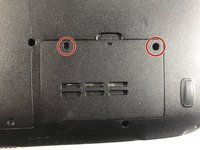
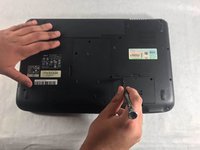
Remove the two 4.1mm Phillips #0 screws securing the RAM cover.
-
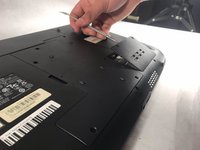
Use a spudger or other similar tool to pry the cover off.
-
-




To reassemble your device, follow these instructions in reverse order.

Team

UMass Dartmouth, Team S2-G5, Bailey Spring 2019 Member of UMass Dartmouth, Team S2-G5, Bailey Spring 2019
UMASSD-BAILEY-S19S2G5
3 Members
60 Guides authored
