Introduction
Use this guide to remove the keyboard from your device. You'll need a metal spudger and some prying power to complete the guide.
What you need
-
-
-
These latches must be released in order for the keyboard to be removed.
 Ask FixBot
-
-
-
-
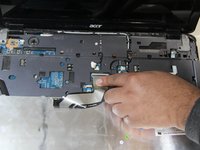
Using a spudger, pry the keyboard from the PC, gently.
-
Lift the keyboard and flip it over, so that it rests on its keys.
-
-
-
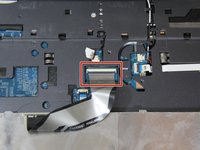
Using your hands, open the latch holding the wire in place, and remove the keyboard.
-
-


Conclusion
To reassemble your device, follow these instructions in reverse order.

Team

UMass Dartmouth, Team S3-G6, Peak Spring 2018 Member of UMass Dartmouth, Team S3-G6, Peak Spring 2018
UMASSD-PEAK-S18S3G6
3 Members
108 Guides authored
