Free Shipping on Domestic Orders $75+

Acer Aspire 5552 RAM Replacement

What you need

  1. Acer Aspire 5552 RAM Replacement, Back Plate Screws: step 1, image 1 of 1
    • Remove the following Phillips 0 screws.

    Ask FixBot

    Add Comment

  2. Acer Aspire 5552 RAM Replacement, Removing back plate.: step 2, image 1 of 3 Acer Aspire 5552 RAM Replacement, Removing back plate.: step 2, image 2 of 3 Acer Aspire 5552 RAM Replacement, Removing back plate.: step 2, image 3 of 3
    • Using an opening device; insert it into the notch, and slide the device along all sides to pop the plate out.

    Ask FixBot

    Add Comment

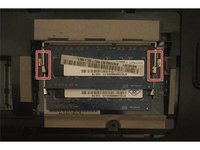
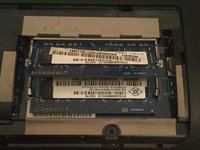
  3. Acer Aspire 5552 RAM Replacement: step 3, image 1 of 2 Acer Aspire 5552 RAM Replacement: step 3, image 2 of 2
    • Gently pull apart on these metal tabs and the RAM will pop up. This can then be safely removed by hand.

    Ask FixBot

    Add Comment

Conclusion

To reassemble your device, follow these instructions in reverse order.

Cancel: I did not complete this guide.

2 other people completed this guide.

August Williams

Member since: 01/02/16

629 Reputation

1 Guide authored

1 Guide Comment

Well laid... Easy does it... Looking forward to learn more from you by been your student☺️

Charles Simutowe Jr - Reply Share

Add Comment

View Statistics:

Past 24 Hours: 2

Past 7 Days: 12

Past 30 Days: 42

All Time: 1,496