Introduction
This guide will show you how to replace the keyboard in an Acer Aspire 5534-1096. A keyboard is an interface used to give commands to a computer. The effectiveness of a keyboard decreases over time. The keys are subjected to multiple keystrokes which weaken the mechanical and electrical connections underneath the keys.
What you need
-
-
-
Insert an opening pick between the top left corner of the keyboard and the laptop body.
 Ask FixBot
-
-
-


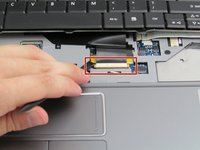
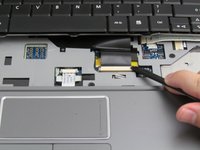


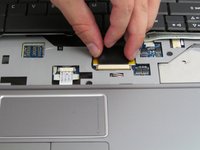
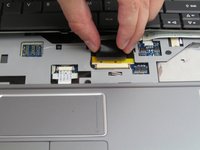

To reassemble your device, follow these instructions in reverse order.
Cancel: I did not complete this guide.
3 other people completed this guide.

Team

Embry-Riddle Aeronautical University, Team S20-G4, Branham Fall 2019 Member of Embry-Riddle Aeronautical University, Team S20-G4, Branham Fall 2019
ERAU-BRANHAM-F19S20G4
4 Members
60 Guides authored
