
Acer Aspire 5349-2592 RAM Replacement

Abderahmane Naidjate and 6 other contributors
Last updated on Apr 15, 2020
Views: 2.6K
View statistics:
- Past 24 Hours:
- 1
- Past 7 Days:
- 12
- Past 30 Days:
- 61
- All Time:
- 2,582
Comments: 0
No one has left comments on this guide. Will you be first?
Go to guide commentsCompleted: 1 2
1 person has marked this guide "completed." Will you be next?
2 people have marked this guide "completed." Including you — great job!
Favorites: 0 1
No one has favorited (and subscribed to) this guide. Will you be the first?
1 person has favorited (and subscribed to) this guide — and that's you!
Introduction
Go to step 1 ↓Does your Acer Aspire 5349-2592 get stuck at a blue screen during bootup, regularly crash or freeze? Does your computer slow down the longer it is in use, or act sluggish when running programs? If so, a ram memory problem might exist, and replacement might be necessary. This guide provides simple steps with minimal tools to replace the ram memory module.
If you are unsure the ram memory is bad, review the Troubleshooting Computer Memory guide located on iFixit’s website at the following URL before proceeding: ++Troubleshooting Computer Memory
Please make sure to follow the prerequisite procedures.
What you need
Tools


-
-
-
Now that the Acer-Aspire 5349-2592 laptop battery is unlocked, press the battery release button down.
-
-
-
Holding down the laptop battery release button, gently pull the battery away from the laptop.
-
-
-
-
Remove all of the screws located on the back of the laptop using your Phillips #0 screwdriver.
-
-
-
-
Pry open the backplate using the iFixit opening tool and remove the backplate from the device.
-
-
-

 Ask FixBot


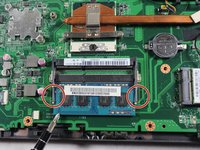
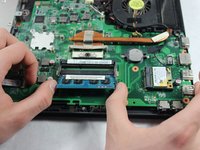
To reassemble your device, follow these instructions in reverse order.
Cancel: I did not complete this guide.
One other person completed this guide.

Team

UMass Dartmouth, Team S1-G3, Simcock Spring 2019 Member of UMass Dartmouth, Team S1-G3, Simcock Spring 2019
UMASSD-SIMCOCK-S19S1G3
4 Members
84 Guides authored
