Introduction
Over time, your Acer Aspire 5100 laptop’s fan may stop working. Laptops without working fans may overheat, damaging internal hardware such as the CPU, hard drive, and motherboard. You may have a broken fan if your laptop regularly feels hot or crashes, your fan makes abnormal or no noise, or your vents lack airflow. If these problems occur, you will need a replacement fan to keep your laptop regulated and running smoothly.
This guide will help you replace your broken fan in four simple steps. Before starting, be sure to unplug your laptop and remove the battery for your personal safety.
What you need
-
-
-
Flip the laptop upside-down.
-
Remove the four screws attached to the large panel.
 Ask FixBot
-
-
-
-
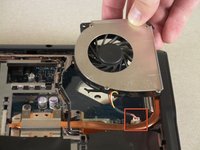
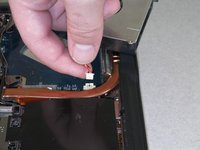
Lift the fan and detach the cable that connects the fan to the motherboard.
-
When detaching the cable, do not pull on the cable itself. Instead, use a small spudger to detach it at the white section that connects it to the motherboard.
-
-


To reassemble your device, follow these instructions in reverse order.
Cancel: I did not complete this guide.
4 other people completed this guide.

Team

Cal Poly, Team 14-39, Forte Fall 2010 Member of Cal Poly, Team 14-39, Forte Fall 2010
CPSU-FORTE-F10S14G39
5 Members
96 Guides authored
