
Acer Aspire 3003WLCi Hard Drive Replacement

Tristin Viale and 3 other contributors
Last updated on Jul 10, 2019
Views: 862
View statistics:
- Past 24 Hours:
- 3
- Past 7 Days:
- 17
- Past 30 Days:
- 56
- All Time:
- 862
Comments: 0
No one has left comments on this guide. Will you be first?
Go to guide commentsCompleted: 0 1
No one has marked this guide "completed." Will you be the first?
1 person has marked this guide "completed." It's you — great job!
Favorites: 0 1
No one has favorited (and subscribed to) this guide. Will you be the first?
1 person has favorited (and subscribed to) this guide — and that's you!
Introduction
Go to step 1 ↓In this guide, you will be instructed on how to replace the hard drive in your laptop. Your hard drive acts as a long-term memory for your computer, and the greater your hard drive’s capacity, the more work you can store on your computer.
This replacement is not difficult and will take you no more than five minutes to complete. It requires very few tools, and can be completed in 4 steps.
What you need
Tools
-
Spudger4.9


-
-
-
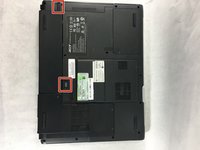
Turn the Acer Aspire 3003WLCi so that the bottom of the laptop is facing up. Orient it so that the battery is on your left.
 Ask FixBot
-
-
-
There will be two switches on the back of the laptop: one at the top of the battery, and one at the bottom.
-
Shift the bottom switch into an upward position in order to unlock the battery.
-
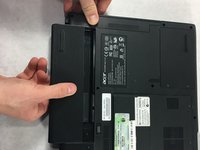
To unlock the upper switch, forcefully push the switch up and hold it in this position.
-
-
-
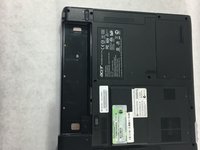
While holding the upper switch in the upward position, remove the battery by pulling it out to the left.
-
-
-
-
-
Locate the hard drive access panel in the upper right corner of the laptop.
-
-
-
Using a Phillips #0 screwdriver, unscrew the two 5mm captive screws attached to the access panel.
-
-
-
-
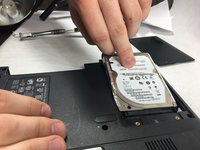
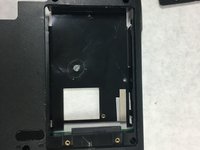
The hard drive is connected to the computer; simply pull it back from the connector and take it out of the laptop casing.
-
-






To reassemble your device, follow these instructions in reverse order.

Team

UMass Dartmouth, Team S2-G2, Bailey Spring 2019 Member of UMass Dartmouth, Team S2-G2, Bailey Spring 2019
UMASSD-BAILEY-S19S2G2
4 Members
60 Guides authored
