Introduction
If you feel like your battery is not holding its charge like it use to or is dying whenever it shows more battery, than it is time to replace the battery on your Acer Aspire 3 A315-24PT-R288. Before removing the battery look at this troubleshooting guide to make sure its not something else.
What you need
-
-
-
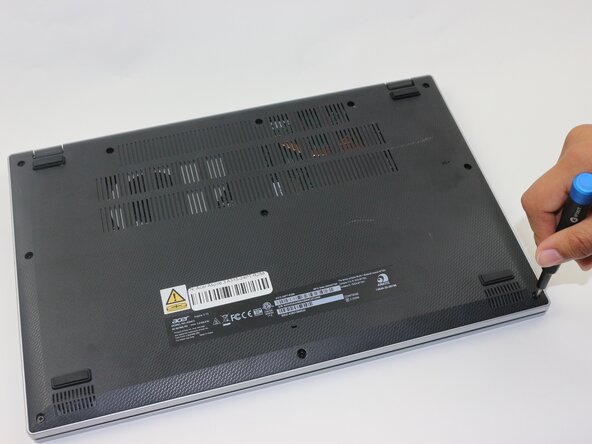
Use a Phillips screwdriver to remove the eleven 2 mm screws that secure the lower case.
 Ask FixBot
-
-
-
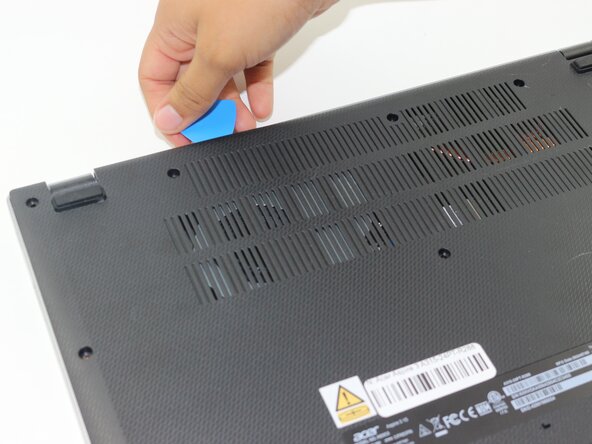
Insert an opening pick in the seam between the chassis and the lower case.
-
Slide the opening pick around the entire perimeter, prying every couple of centimeters, to release all of the retaining clips that secure the lower case.
-
Remove the lower case.
-
-
-
-
-
-
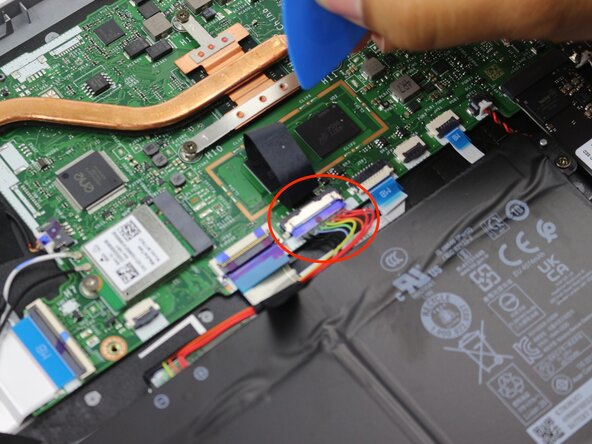
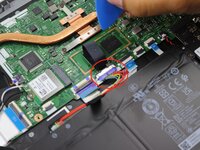
Remove the tape on the battery connector using tweezers or your fingers.
-
-
-
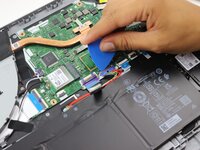
Use an opening pick or the flat end of a spudger to gently push the battery connector out of its motherboard socket.
-
-
-







To reassemble your device, follow the above steps in reverse order.
For optimal performance, after completing this guide, calibrate your newly installed battery.
Take your e-waste to an R2 or e-Stewards certified recycler.
Repair didn’t go as planned? Try some basic troubleshooting or ask our Answers community for help.
Cancel: I did not complete this guide.
2 other people completed this guide.

Team

Sam Houston State, Team 17-5, Thornton Spring 2025 Member of Sam Houston State, Team 17-5, Thornton Spring 2025
SHSU-THORNTON-S25S17G5
3 Members
55 Guides authored
