This translation was generated by a machine and has not been reviewed by a person yet. Speak this language? Review it.

Access various components for replacement on the Why! Tablet

Felice Suglia and one other contributor
Last updated on Sep 2, 2026
Views: 326
View statistics:
- Past 24 Hours:
- 4
- Past 7 Days:
- 21
- Past 30 Days:
- 76
- All Time:
- 326
Comments: 0
No one has left comments on this guide. Will you be first?
Go to guide commentsCompleted: 1 2
1 person has marked this guide "completed." Will you be next?
2 people have marked this guide "completed." Including you — great job!
Favorites: 0 1
No one has favorited (and subscribed to) this guide. Will you be the first?
1 person has favorited (and subscribed to) this guide — and that's you!
Community-Contributed Guide
An awesome member of our community made this guide. It was not created by iFixit staff.
Introduction
Go to step 1 ↓This Guide is on gaining access to the different components of the Why! Tablet for replacement purposes.
What you need
Tools

-
-
-
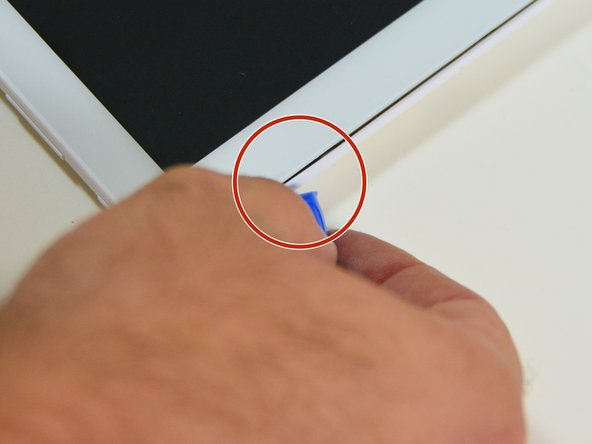
Using a plastic opening tool, insert the tip into the corner of the tablet, between the screen and the rear case.
-
Gently pry to start separating the rear case at this corner.
 Ask FixBot
-
-
-
-
Slide the opening tool along the edge of the tablet to release the rear case fasteners, reinserting the tool at other points along the perimeter as needed.
-
Once the perimeter is clear, lift and remove the rear case to access the internal components (motherboard, battery).
-
-




To reassemble your device, follow these instructions in reverse order.
Cancel: I did not complete this guide.
One other person completed this guide.
Special thanks to these translators:
100%

Juan Garcia is helping us fix the world! Want to contribute?
Start translating ›

