
ATT Trek HD Battery Replacement

Hunter Barger and 3 other contributors
Last updated on Aug 22, 2023
Views: 1.6K
View statistics:
- Past 24 Hours:
- 1
- Past 7 Days:
- 7
- Past 30 Days:
- 61
- All Time:
- 1,616
Comments: 0
No one has left comments on this guide. Will you be first?
Go to guide commentsCompleted: 2 3
2 people have marked this guide "completed." Will you be next?
3 people have marked this guide "completed." Including you — great job!
Favorites: 0 1
No one has favorited (and subscribed to) this guide. Will you be the first?
1 person has favorited (and subscribed to) this guide — and that's you!
Introduction
Go to step 1 ↓This guide will show how to replace the battery in the device. The battery may need to be replaced if it will not charge, or if it keeps dying rapidly. There should be no problems when replacing the battery. The tools that will be needed for replacing the battery are a plastic opening tool and the Phillips #00 screwdriver.
What you need
Tools


-
-
-
To separate the screen from the back panel, run the plastic opening tool along the outer edge of the device.
 Ask FixBot
-
-
-
-
-
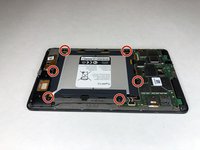
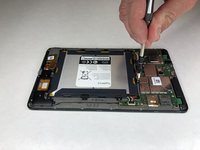
Use a Phillips #00 screwdriver to remove the six 2.5 mm screws located around the perimeter of the battery.
-
-
-
-
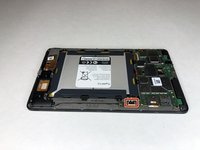
Use the plastic opening tool to disconnect the black battery connector.
-
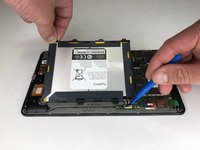
Gently lift the battery out of the device.
-
-




To reassemble your device, follow these instructions in reverse order.
Cancel: I did not complete this guide.
2 other people completed this guide.

Team

University of Alabama, Team S1-G3, Bedsole Spring 2019 Member of University of Alabama, Team S1-G3, Bedsole Spring 2019
UA-BEDSOLE-S19S1G3
4 Members
72 Guides authored
