
ATT CL2940 Handset Cord Replacement

Charles Messmore and 5 other contributors
Last updated on May 6, 2021
Views: 965
View statistics:
- Past 24 Hours:
- 2
- Past 7 Days:
- 17
- Past 30 Days:
- 91
- All Time:
- 965
Comments: 0
No one has left comments on this guide. Will you be first?
Go to guide commentsCompleted: 1 2
1 person has marked this guide "completed." Will you be next?
2 people have marked this guide "completed." Including you — great job!
Favorites: 0 1
No one has favorited (and subscribed to) this guide. Will you be the first?
1 person has favorited (and subscribed to) this guide — and that's you!
Step Trimmer
This guide has unnecessary steps. Trim them to be more concise!
Introduction
Go to step 1 ↓This guide will help you if you experience difficulty hearing from the ATT CL2940 handset. The issue may be with the handset cord. Use this guide to remove the cord and reattach it to determine if it was not plugged in securely. If this does not fix the problem, try replacing the old cord with a new one.
-
-
-
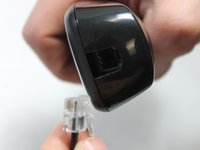
Pinch the clip on the plug and pull the cord from the base in order to release the cord.
-
-
-
-
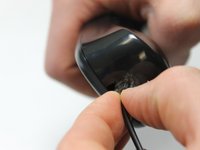
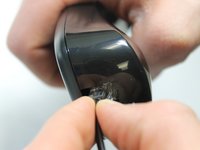
Pinch the clip on the plug and pull away from the handset in order to release the cord.
-


 Ask FixBot


To reassemble your device, follow these instructions in reverse order.
Cancel: I did not complete this guide.
One other person completed this guide.

Team

IUPUI, Team 1-1, Harley Spring 2016 Member of IUPUI, Team 1-1, Harley Spring 2016
IUPUI-HARLEY-S16S1G1
4 Members
84 Guides authored
