Free Shipping on Domestic Orders $75+

ASUS X44H-BBR4 Hard Drive Replacement

Views: 1.7K

View statistics:

Past 24 Hours:
3
Past 7 Days:
21
Past 30 Days:
87
All Time:
1,653
Comments: 0

No one has left comments on this guide. Will you be first?

Go to guide comments
Completed: 1

1 person has marked this guide "completed." Will you be next?

Favorites: 0

No one has favorited (and subscribed to) this guide. Will you be the first?

Time Required: 20 minutes
Difficulty: Moderate
ASUS X44H-BBR4 Hard Drive Replacement

Introduction

Go to step 1 ↓

Use this guide to help you replace the Hard Drive. Don't forget to keep track of your screws.

What you need

Tools

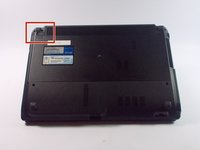
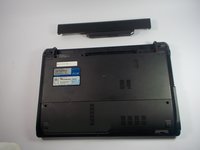
    1. ASUS X44H-BBR4 Hard Drive Replacement, Battery: step 1, image 1 of 2 ASUS X44H-BBR4 Hard Drive Replacement, Battery: step 1, image 2 of 2
      • Flip the device over.

      Ask FixBot
      Add Comment

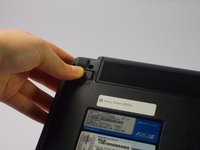
    2. ASUS X44H-BBR4 Hard Drive Replacement: step 2, image 1 of 3 ASUS X44H-BBR4 Hard Drive Replacement: step 2, image 2 of 3 ASUS X44H-BBR4 Hard Drive Replacement: step 2, image 3 of 3
      • Slide the right lock button to the unlock position.

      • After it is unlocked, a red line will be visible.

      Ask FixBot

      Add Comment

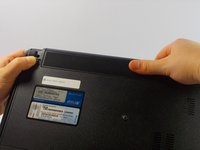
    3. ASUS X44H-BBR4 Hard Drive Replacement: step 3, image 1 of 2 ASUS X44H-BBR4 Hard Drive Replacement: step 3, image 2 of 2
      • Slide the left lock button into the unlock position and hold.

      Ask FixBot

      Add Comment

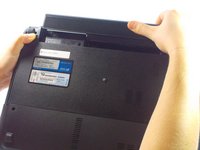
    4. ASUS X44H-BBR4 Hard Drive Replacement: step 4, image 1 of 3 ASUS X44H-BBR4 Hard Drive Replacement: step 4, image 2 of 3 ASUS X44H-BBR4 Hard Drive Replacement: step 4, image 3 of 3
      • While holding the left lock button in the unlock position, push the battery from the center away from you.

      Ask FixBot
      Add Comment

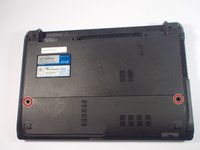
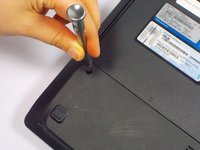
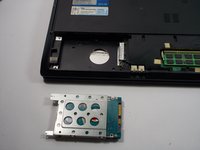
    1. ASUS X44H-BBR4 Hard Drive Replacement, Hard Drive: step 5, image 1 of 2 ASUS X44H-BBR4 Hard Drive Replacement, Hard Drive: step 5, image 2 of 2
      • Remove the two 9 mm Phillips head screws with the PH0 bit indicated by the red circles in the picture.

      Ask FixBot
      Add Comment

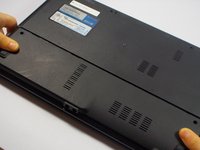
    2. ASUS X44H-BBR4 Hard Drive Replacement: step 6, image 1 of 2 ASUS X44H-BBR4 Hard Drive Replacement: step 6, image 2 of 2
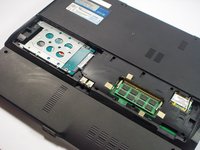
      • Once the screws are removed, slide the back panel away from the computer.

      Ask FixBot

      Add Comment

    3. ASUS X44H-BBR4 Hard Drive Replacement: step 7, image 1 of 1
      • Remove the 9mm Phillips head screw in the left bottom corner of the hard drive with the PH0 bit.

      Ask FixBot

      Add Comment

    4. ASUS X44H-BBR4 Hard Drive Replacement: step 8, image 1 of 2 ASUS X44H-BBR4 Hard Drive Replacement: step 8, image 2 of 2
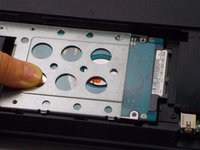
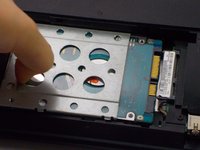
      • Slide the hard drive to the left, unlocking it from its default position.

      Ask FixBot

      Add Comment

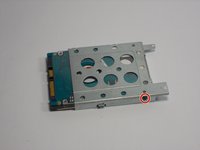
    5. ASUS X44H-BBR4 Hard Drive Replacement: step 9, image 1 of 2 ASUS X44H-BBR4 Hard Drive Replacement: step 9, image 2 of 2
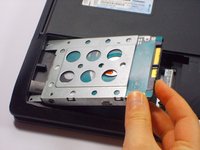
      • Pull the hard drive upwards and take it out of its position.

      Ask FixBot
      Add Comment

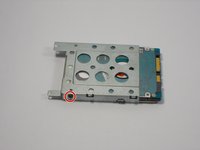
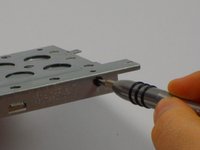
    6. ASUS X44H-BBR4 Hard Drive Replacement: step 10, image 1 of 3 ASUS X44H-BBR4 Hard Drive Replacement: step 10, image 2 of 3 ASUS X44H-BBR4 Hard Drive Replacement: step 10, image 3 of 3
      • Remove two 3mm Phillips head screws, one located on each side of the metal casing holding the hard drive using the PH0 bit.

      Ask FixBot
      Add Comment
    7. ASUS X44H-BBR4 Hard Drive Replacement: step 11, image 1 of 1
      • Pull upwards on the metal casing and it will come off.

      Ask FixBot

      Add Comment

Conclusion

To reassemble your device, follow these instructions in reverse order.

Cancel: I did not complete this guide.

One other person completed this guide.

Devaj Ramsamooj

Member since: 10/21/15

824 Reputation

5 Guides authored

Team

UMass Dartmouth, Team 4-3, Catania Fall 2015 Member of UMass Dartmouth, Team 4-3, Catania Fall 2015

UMASSD-CATANIA-F15S4G3

4 Members

84 Guides authored

0 Guide Comments

Add Comment

View Statistics:

Past 24 Hours: 3

Past 7 Days: 21

Past 30 Days: 87

All Time: 1,653