Free Shipping on Domestic Orders $75+

ASUS X44H-BBR4 Battery Replacement

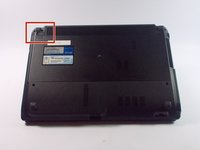
  1. ASUS X44H-BBR4 Battery Replacement, Battery: step 1, image 1 of 2 ASUS X44H-BBR4 Battery Replacement, Battery: step 1, image 2 of 2
    • Flip the device over.

    Ask FixBot

    Add Comment

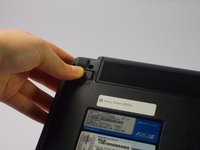
  2. ASUS X44H-BBR4 Battery Replacement: step 2, image 1 of 3 ASUS X44H-BBR4 Battery Replacement: step 2, image 2 of 3 ASUS X44H-BBR4 Battery Replacement: step 2, image 3 of 3
    • Slide the right lock button to the unlock position.

    • After it is unlocked, a red line will be visible.

    Ask FixBot

    Add Comment

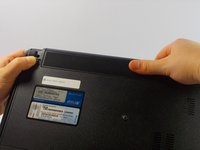
  3. ASUS X44H-BBR4 Battery Replacement: step 3, image 1 of 2 ASUS X44H-BBR4 Battery Replacement: step 3, image 2 of 2
    • Slide the left lock button into the unlock position and hold.

    Ask FixBot

    Add Comment

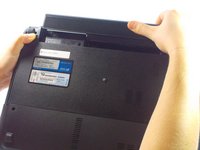
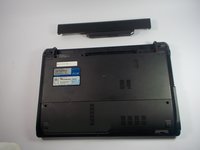
  4. ASUS X44H-BBR4 Battery Replacement: step 4, image 1 of 3 ASUS X44H-BBR4 Battery Replacement: step 4, image 2 of 3 ASUS X44H-BBR4 Battery Replacement: step 4, image 3 of 3
    • While holding the left lock button in the unlock position, push the battery from the center away from you.

    Ask FixBot

    Add Comment

Conclusion

To reassemble your device, follow these instructions in reverse order.

Cancel: I did not complete this guide.

2 other people completed this guide.

Kelly Merlo

Member since: 10/14/15

500 Reputation

2 Guides authored

Team

UMass Dartmouth, Team 4-3, Catania Fall 2015 Member of UMass Dartmouth, Team 4-3, Catania Fall 2015

UMASSD-CATANIA-F15S4G3

4 Members

8 Guides authored

0 Guide Comments

Add Comment

View Statistics:

Past 24 Hours: 1

Past 7 Days: 6

Past 30 Days: 28

All Time: 1,231