
ASUS ROG Zephyrus M15GU205L Display Cable Replacement

Yahir Donis and 5 other contributors
Last updated on Jan 15, 2026
Views: 1.8K
View statistics:
- Past 24 Hours:
- 1
- Past 7 Days:
- 27
- Past 30 Days:
- 128
- All Time:
- 1,766
Comments: 0
No one has left comments on this guide. Will you be first?
Go to guide commentsCompleted: 0 1
No one has marked this guide "completed." Will you be the first?
1 person has marked this guide "completed." It's you — great job!
Favorites: 0 1
No one has favorited (and subscribed to) this guide. Will you be the first?
1 person has favorited (and subscribed to) this guide — and that's you!
Action Shots
Be an action hero! This guide needs images that better demonstrate how to perform specific actions.
Needs More Images
A few more images would make this guide's procedures crystal clear.
Introduction
Go to step 1 ↓If your screen is glitching or the screen goes in and out, it might be a loose display connector. Use this guide if you need to check to see if your display connector is loose.
What you need
Tools


-
-
-
Remove fifteen 10 mm screws from the bottom cover using a Phillips #0 screwdriver.
 Ask FixBot
-
-
-
Remove six 4.8 mm screws that secure the battery using a Phillips #00 screwdriver.
-
-
Tool used on this step:Tweezers$4.99
-
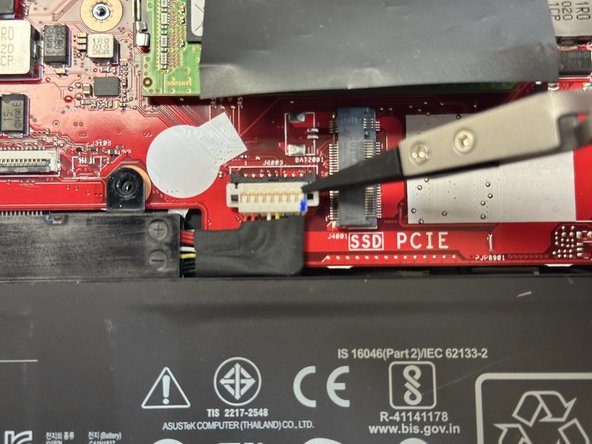
Disconnect the 8-pin battery that secures the battery to the motherboard.
-
-
-
-
-
-
Once the back has been removed, locate this connection cable.
-
Check to see if the connector is in the pin slot; if not, locate the connector.
-
-
-
If the connection is loose, connect the pins into the slot.
-
Once the connector is connected, do these steps in reverse.
-
-





To reassemble your device, follow these instructions in reverse order.

Team

Gateway, Team 69-69, Gonzalez Fall 2023 Member of Gateway, Team 69-69, Gonzalez Fall 2023
GCC-GONZALEZ-F23S69G69
4 Members
48 Guides authored
