Free Shipping on Domestic Orders $75+

ASUS ROG Spatha X Side Buttons Assembly Replacement

What you need

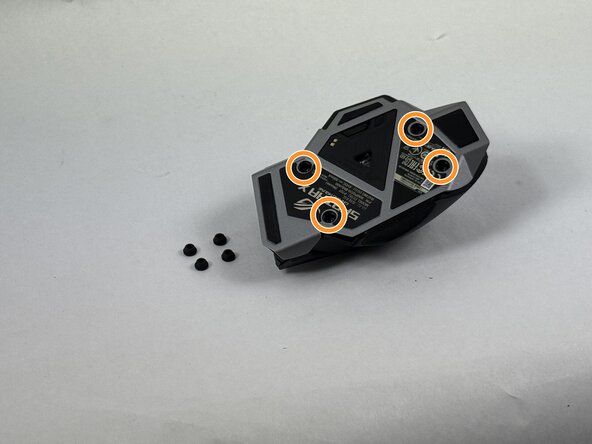
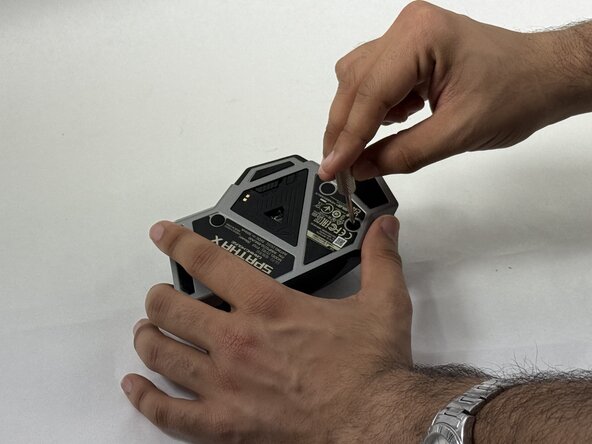
  1. ASUS ROG Spatha X Side Buttons Assembly Replacement, Mouse Cover: step 1, image 1 of 3 ASUS ROG Spatha X Side Buttons Assembly Replacement, Mouse Cover: step 1, image 2 of 3 ASUS ROG Spatha X Side Buttons Assembly Replacement, Mouse Cover: step 1, image 3 of 3
    • Make sure the mouse is unplugged and the power switch on the underside is set to the off position.

    • Use the pointed edge of a spudger to remove the four soft rubber covers on the underside of the mouse.

    • Use the included Torx screwdriver, or a T3 Torx screwdriver, to remove the four 4 mm screws.

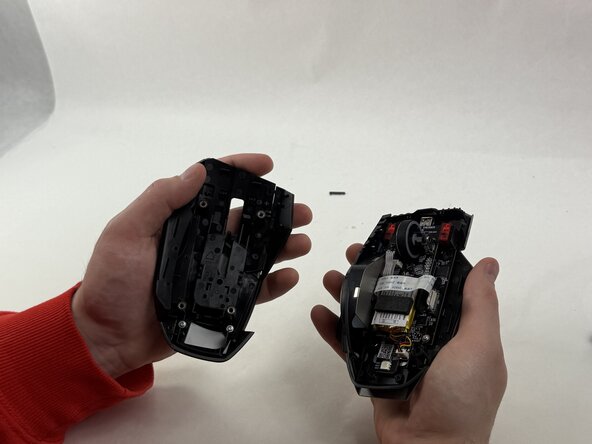
  2. ASUS ROG Spatha X Side Buttons Assembly Replacement: step 2, image 1 of 2 ASUS ROG Spatha X Side Buttons Assembly Replacement: step 2, image 2 of 2
    • Lift the upper mouse cover up and off.

  3. ASUS ROG Spatha X Side Buttons Assembly Replacement, Side Buttons Assembly: step 3, image 1 of 2 ASUS ROG Spatha X Side Buttons Assembly Replacement, Side Buttons Assembly: step 3, image 2 of 2
    • Disconnect the side button assembly ribbon cable from the motherboard.

  4. ASUS ROG Spatha X Side Buttons Assembly Replacement: step 4, image 1 of 2 ASUS ROG Spatha X Side Buttons Assembly Replacement: step 4, image 2 of 2
    • Remove the two 5 mm Phillips screws inside the mouse.

  5. ASUS ROG Spatha X Side Buttons Assembly Replacement: step 5, image 1 of 3 ASUS ROG Spatha X Side Buttons Assembly Replacement: step 5, image 2 of 3 ASUS ROG Spatha X Side Buttons Assembly Replacement: step 5, image 3 of 3
    • Remove the mouse skate under the thumb rest.

    • Remove the last 5 mm Phillips screw.

  6. ASUS ROG Spatha X Side Buttons Assembly Replacement: step 6, image 1 of 2 ASUS ROG Spatha X Side Buttons Assembly Replacement: step 6, image 2 of 2
    • Gently remove the side button assembly.

Conclusion

To reassemble your device, follow the above steps in reverse order.
Take your e-waste to an R2 or e-Stewards certified recycler.
Repair didn’t go as planned? Try some basic troubleshooting or ask our Answers community for help.

cgrabowski1

Member since: 03/21/25

671 Reputation

5 Guides authored

Team

0 Guide Comments

Add Comment

View Statistics:

Past 24 Hours: 3

Past 7 Days: 10

Past 30 Days: 40

All Time: 415