Free Shipping on Domestic Orders $75+

ASUS ROG Spatha X Mouse Cover Removal

What you need

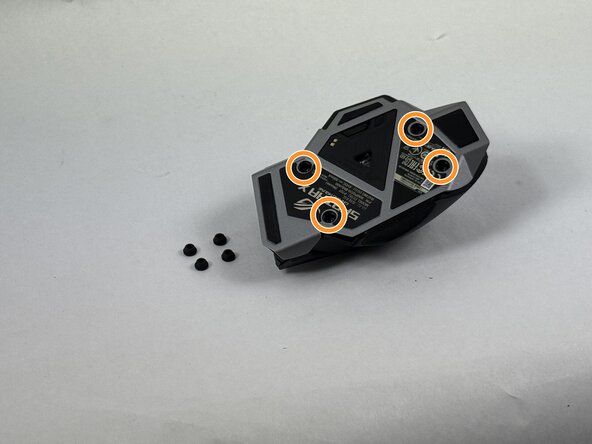
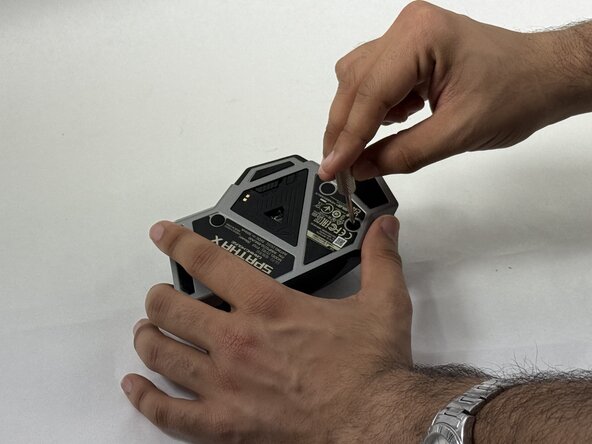
  1. ASUS ROG Spatha X Mouse Cover Removal, Mouse Cover: step 1, image 1 of 3 ASUS ROG Spatha X Mouse Cover Removal, Mouse Cover: step 1, image 2 of 3 ASUS ROG Spatha X Mouse Cover Removal, Mouse Cover: step 1, image 3 of 3
    • Make sure the mouse is unplugged and the power switch on the underside is set to the off position.

    • Use the pointed edge of a spudger to remove the four soft rubber covers on the underside of the mouse.

    • Use the included Torx screwdriver, or a T3 Torx screwdriver, to remove the four 4 mm screws.

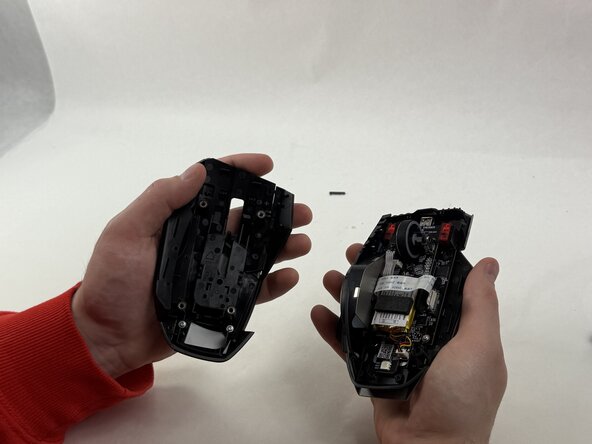
  2. ASUS ROG Spatha X Mouse Cover Removal: step 2, image 1 of 2 ASUS ROG Spatha X Mouse Cover Removal: step 2, image 2 of 2
    • Lift the upper mouse cover up and off.

Finish Line

cgrabowski1

Member since: 03/21/25

671 Reputation

5 Guides authored

Team

0 Guide Comments

Add Comment

View Statistics:

Past 24 Hours: 3

Past 7 Days: 10

Past 30 Days: 35

All Time: 288