Free Shipping on Domestic Orders $75+

ASUS ROG G46VW RAM Replacement

What you need

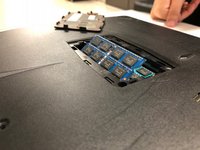
    1. ASUS ROG G46VW RAM Replacement, RAM: step 1, image 1 of 2 ASUS ROG G46VW RAM Replacement, RAM: step 1, image 2 of 2
      • Lift the screw cover and remove the screw using a Phillips #0 screwdriver.

      Ask FixBot

      Add Comment

    2. ASUS ROG G46VW RAM Replacement: step 2, image 1 of 1
      • Remove the RAM cover by lifting the screw cover and pulling away firmly.

      Ask FixBot

      Add Comment

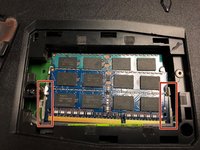
    3. ASUS ROG G46VW RAM Replacement: step 3, image 1 of 2 ASUS ROG G46VW RAM Replacement: step 3, image 2 of 2
      • Push outwards on the clips to release the RAM stick. The stick should pop up at an angle.

      Ask FixBot

      Add Comment

    4. ASUS ROG G46VW RAM Replacement: step 4, image 1 of 1
      • Pull out the RAM stick carefully.

      • Do not use a prying motion as this will damage the hardware. Be careful not to damage the gold section of the RAM stick.

      Ask FixBot

      Add Comment

    5. ASUS ROG G46VW RAM Replacement: step 5, image 1 of 1
      • Repeat steps 3-4 to remove the second RAM stick.

      Ask FixBot

      Add Comment

Conclusion

To reassemble your device, follow these instructions in reverse order.

Cancel: I did not complete this guide.

0 Guide Comments

Add Comment

View Statistics:

Past 24 Hours: 0

Past 7 Days: 3

Past 30 Days: 24

All Time: 927