Introduction
Does the phone make a poor connection when sliding into the station? Follow this guide to replace the slider connector on the station.
What you need
-
-
-
Insert the plastic opening tool between the edge of the screen and the back cover.
-
Gently pry them apart. Use hands to pull them apart if necessary.
 Ask FixBot
-
-
-
Tool used on this step:Tweezers$4.99
-
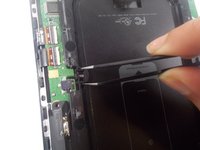
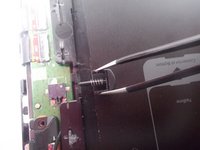
Use tweezers to squeeze and slowly remove the slider connection piece.
-
-


Conclusion
To reassemble your device, follow these instructions in reverse order.

Team

UMass Dartmouth, Team S2-G7, Peak Fall 2018 Member of UMass Dartmouth, Team S2-G7, Peak Fall 2018
UMASSD-PEAK-F18S2G7
3 Members
48 Guides authored
