Free Shipping on Domestic Orders $75+

ASUS PadFone X Rear Facing Camera Replacement

What you need

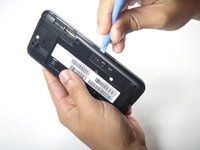
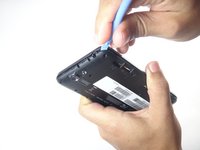
    1. ASUS PadFone X Rear Facing Camera Replacement, Remove the back panel: step 1, image 1 of 2 ASUS PadFone X Rear Facing Camera Replacement, Remove the back panel: step 1, image 2 of 2
      • Using the blue plastic opening tool, insert the tip into the crease between the back cover and the phone and pry it upward.

      • Work your way around the phone until the entire back cover is loose.

      Ask FixBot

      Add Comment

    2. ASUS PadFone X Rear Facing Camera Replacement, Remove the screws.: step 2, image 1 of 3 ASUS PadFone X Rear Facing Camera Replacement, Remove the screws.: step 2, image 2 of 3 ASUS PadFone X Rear Facing Camera Replacement, Remove the screws.: step 2, image 3 of 3
      • Remove the thirteen 3.6 mm screws using the torx T5 bit in the screwdriver.

      Ask FixBot

      Add Comment

    3. ASUS PadFone X Rear Facing Camera Replacement, Remove the Mid-Frame.: step 3, image 1 of 2 ASUS PadFone X Rear Facing Camera Replacement, Remove the Mid-Frame.: step 3, image 2 of 2
      • Using the blue plastic opening tool, insert the tip into the crease between the mid-frame and the phone and pry it upwards.

      • Work your way around the phone until the entire back cover is loose and remove the mid-frame.

      Ask FixBot

      Add Comment

    4. ASUS PadFone X Rear Facing Camera Replacement, Remove the camera connector.: step 4, image 1 of 1
      • Use the blue plastic opening tool to gently pry the camera connector up from its socket on the motherboard.

      • Applying too much force may damage the connector.

      Ask FixBot

      Add Comment

    5. ASUS PadFone X Rear Facing Camera Replacement, Remove the camera.: step 5, image 1 of 1
      Tool used on this step:
      Tweezers
      $4.99
      Buy
      • Using the tweezers, remove the rear camera from the Padfone X.

      • The camera is lightly glued to the motherboard. You may need to use a plastic opening tool to loosen the adhesive under the camera.

      Ask FixBot

      Add Comment

    6. ASUS PadFone X Rear Facing Camera Replacement, Replacing the camera.: step 6, image 1 of 1
      • Once the camera has been pulled out, replace the old camera with a new camera.

      Ask FixBot

      Add Comment

Conclusion

To reassemble your device, follow these instructions in reverse order.

Cancel: I did not complete this guide.

nestor

Member since: 10/07/14

101 Reputation

1 Guide authored

Team

USF Tampa, Team 8-4, Leahy Fall 2014 Member of USF Tampa, Team 8-4, Leahy Fall 2014

USFT-LEAHY-F14S8G4

4 Members

60 Guides authored

0 Guide Comments

Add Comment

View Statistics:

Past 24 Hours: 0

Past 7 Days: 5

Past 30 Days: 29

All Time: 861