Introduction
This guide will teach you how to properly take apart your Asus to replace the keyboard.
What you need
-
-
-
Open the laptop so that you can see the keyboard.
-
Unlock the three keyboard tabs by pushing down on the silver tabs with a Spudger.
 Ask FixBot
-
-
-
Tool used on this step:Tweezers$4.99
-
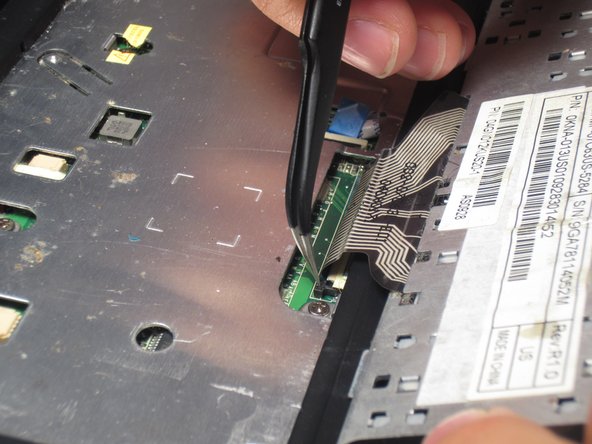
Using a pair of tweezers, disconnect the cable at the bottom of the keyboard by flipping the two lock switches up on both sides of the cable.
-
-




To reassemble your device, follow these instructions in reverse order.
Cancel: I did not complete this guide.
One other person completed this guide.

Team

Sam Houston State, Team 1-6, Blackburne Fall 2015 Member of Sam Houston State, Team 1-6, Blackburne Fall 2015
SHSU-BLACKBURNE-F15S1G6
4 Members
60 Guides authored
