Free Shipping on Domestic Orders $75+

ASUS D550MA-DS01 DVD Drive Replacement

What you need

  1. ASUS D550MA-DS01 DVD Drive Replacement, Keyboard Module: step 1, image 1 of 2 ASUS D550MA-DS01 DVD Drive Replacement, Keyboard Module: step 1, image 2 of 2
    • Before you begin, be sure to turn off your laptop and unplug it from the outlet.

    • Use a Philips #1 screwdriver to remove the nine screws from the back cover.

    Ask FixBot

    Add Comment

  2. ASUS D550MA-DS01 DVD Drive Replacement: step 2, image 1 of 1
    • Turn the laptop over and open the display.

    • Insert the flat edge of the spudger into the crease of the keyboard cover.

    • While the spudger is in the crease, carefully pry open the casing by sliding the spudger along the edge.

    • Do not use excessive force to pry open the lid. You should hear each plastic clip snap open as you run the spudger along the edge.

    Ask FixBot

    Add Comment

  3. ASUS D550MA-DS01 DVD Drive Replacement: step 3, image 1 of 2 ASUS D550MA-DS01 DVD Drive Replacement: step 3, image 2 of 2
    • Make sure that the entire cover has been released from the plastic clips.

    • Slowly lift the cover open from the front of the laptop, but do not completely remove it.

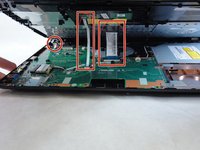
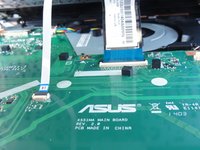
    • Note the locations of the three white and blue data cables connecting to the keyboard to the computer's main board.

    Ask FixBot

    Add Comment

  4. ASUS D550MA-DS01 DVD Drive Replacement: step 4, image 1 of 1
    • If you are only replacing the battery, you can skip this step and the next. Shift the keyboard module away from the display and set it such that the fragile flex cables are not strained.

    • Disconnect the three data cables from the motherboard.

    • To unlock a ZIF connector, use the tip of a spudger or your fingernail to flip up the small, hinged locking flap. Carefully slide the unlocked cable out of the socket.

    Ask FixBot

    Add Comment

  5. ASUS D550MA-DS01 DVD Drive Replacement: step 5, image 1 of 1
    • Remove the fully disconnected keyboard module from the laptop.

    Ask FixBot

    Add Comment

  6. ASUS D550MA-DS01 DVD Drive Replacement, DVD Drive: step 6, image 1 of 2 ASUS D550MA-DS01 DVD Drive Replacement, DVD Drive: step 6, image 2 of 2
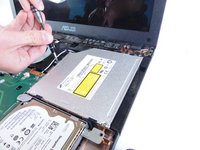
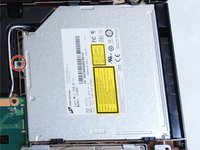
    • Remove the single screw that is holding the drive in place using the Phillips #1 Screwdriver.

    Ask FixBot

    Add Comment

  7. ASUS D550MA-DS01 DVD Drive Replacement: step 7, image 1 of 1
    • Slide the drive out to the right of the laptop to disconnect from the motherboard.

    • Lifting the drive straight out without sliding to the right will damage the motherboard.

    Ask FixBot

    Add Comment

Conclusion

To reassemble your device, follow these instructions in reverse order.

Cancel: I did not complete this guide.

Richard Johnson

Member since: 09/16/15

707 Reputation

5 Guides authored

Team

IUPUI, Team 1-2, Baechle Fall 2015 Member of IUPUI, Team 1-2, Baechle Fall 2015

IUPUI-BAECHLE-F15S1G2

3 Members

8 Guides authored

0 Guide Comments

Add Comment

View Statistics:

Past 24 Hours: 1

Past 7 Days: 10

Past 30 Days: 38

All Time: 841