
ANKER SoundCore Bluetooth Chip Replacement

Garrin Schaap and 5 other contributors
Last updated on May 5, 2020
Views: 6.2K
View statistics:
- Past 24 Hours:
- 5
- Past 7 Days:
- 28
- Past 30 Days:
- 103
- All Time:
- 6,173
Comments: 0
No one has left comments on this guide. Will you be first?
Go to guide commentsCompleted: 1 2
1 person has marked this guide "completed." Will you be next?
2 people have marked this guide "completed." Including you — great job!
Favorites: 0 1
No one has favorited (and subscribed to) this guide. Will you be the first?
1 person has favorited (and subscribed to) this guide — and that's you!
Introduction
Go to step 1 ↓This procedure is necessary if the Bluetooth chip is broken and needs to be replaced. If the device’s Bluetooth connection chip is broken, it stops the device from pairing at all and prevents any Bluetooth interaction.
Before attempting to replace anything, it is recommended that you look at this device’s troubleshooting guide.
If you wish to restore the Bluetooth ability of your speaker, you must desolder the Bluetooth chip and replace it. Beware this is incredibly hard to do. The procedure requires tools to open the speaker and unscrew the fastening screws. Soldering experience is needed.
What you need
Parts
Tools


-
-
-
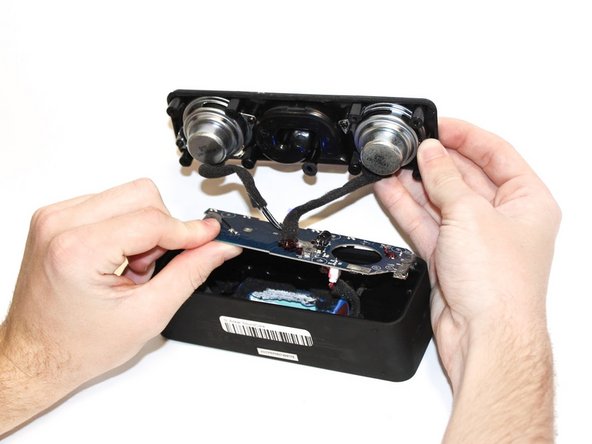
Use the plastic opening tool to pry off the screen.
-
Remove the screen from the device.
 Ask FixBot
-
-
-
-
Desolder the Bluetooth chip (on the right side of the board) and replace it with the new Bluetooth chip.
-
-




To reassemble your device, follow these instructions in reverse order.
Cancel: I did not complete this guide.
One other person completed this guide.

Team

Cal Poly, Team S22-G1, Regan Winter 2020 Member of Cal Poly, Team S22-G1, Regan Winter 2020
CPSU-REGAN-W20S22G1
5 Members
60 Guides authored
