Introduction
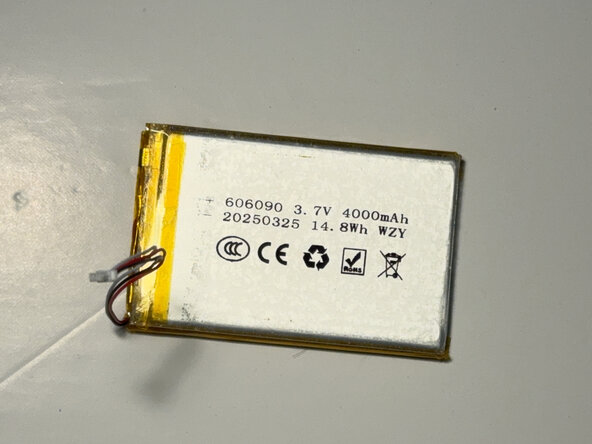
This repair guide provides step-by-step instructions for replacing the Lithium-Ion battery pack "606090 3.7v 4000 mAh 3pin" in the AJAZZ AK820 Pro keyboard.
If your keyboard quickly loses power or does not hold its charge in Bluetooth mode, replacing the battery can restore normal operation.
This repair requires opening the keyboard case and disconnecting the battery from the main board.
Before you begin the repair, power off the device, and make sure you ground yourself to get rid of any static electricity.
Caution: If the keyboard becomes unusually hot, the battery appears swollen or puffy, or you notice a strange odor, the battery may be swollen. Review the What to do with a swollen battery guide before continuing. Swollen lithium-ion batteries can catch fire or explode if handled improperly, so use extreme caution.
What you need
-
-
Pull out the volume knob first to allow easier access when separating the frame.
 Ask FixBot
-
-
-
Insert a nylon spudger or opening tool into the seam at the marked location.
-
Gently slide the tool along the edge of the body to release the plastic clips securing the two halves.
-
-
-
-
The red marker indicates the battery cable and the connector.
-
The orange marker indicates the location of the USB-C port to help determine the correct orientation.
-
-
-
Use a pair of tweezers to gently pull out the cable connector from the socket on the board, then follow it to locate the battery.
-
If the tweezers aren't working, use the point of a spudger to push on alternating sides of the battery connector to "walk" it out of its socket.
-
Remove the old battery.
-
-
-
When installing the new battery, reassemble the layers in their original order.
-
To connect the new battery cable, align the connector and use a spudger or clean fingernail to push it fully into the socket.
-
-
-
Align the two halves of the case and press them together gently until the plastic clips snap back into place.
-
You just replaced the battery. Good Job!
-




You have successfully replaced your keyboard’s battery. Take your e-waste to an R2 or e-Stewards certified recycler.
Cancel: I did not complete this guide.
3 other people completed this guide.

Team

York University, Team 1-11, Woodhouse Winter 2026 Member of York University, Team 1-11, Woodhouse Winter 2026
YORK-WOODHOUSE-W26S1G11
2 Members
1 Guide authored
