
ACER Aspire 7750G-6645 RAM Replacement

Dylan Souza and 4 other contributors
Last updated on Aug 8, 2019
Views: 1.3K
View statistics:
- Past 24 Hours:
- 1
- Past 7 Days:
- 23
- Past 30 Days:
- 77
- All Time:
- 1,297
Comments: 0
No one has left comments on this guide. Will you be first?
Go to guide commentsCompleted: 0 1
No one has marked this guide "completed." Will you be the first?
1 person has marked this guide "completed." It's you — great job!
Favorites: 0 1
No one has favorited (and subscribed to) this guide. Will you be the first?
1 person has favorited (and subscribed to) this guide — and that's you!
Introduction
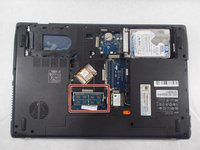
Go to step 1 ↓This guide demonstrates the removal of the RAM for an ACER Aspire 7750G-6645 laptop. This may be helpful if the computer is running slowly, or is having general memory issues.
What you need


-
-
-
Remove three 60mm Phillips #00 screws that are holding the bottom cover in place.
 Ask FixBot
-
-
-
Lift up the back cover of the device, you may need to use a spudger to assist.
-
-
-
-
-
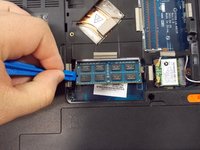
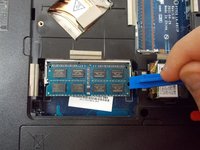
Using the iFixit opening tools, gently pry the connectors away from the RAM.
-
-
-



To reassemble your device, follow these instructions in reverse order.

Team

UMass Dartmouth, Team S1-G2, Botvin Spring 2019 Member of UMass Dartmouth, Team S1-G2, Botvin Spring 2019
UMASSD-BOTVIN-S19S1G2
4 Members
60 Guides authored
