Introduction
If your 2015 Ford C-Max (also applicable to 2013–2018 models) wipers are leaving streaks, skipping across the glass, or failing to clear rain effectively, use this guide to replace the front windshield wiper blades.
The front windshield wipers maintain clear visibility by removing rain, snow, and debris from the windshield. Over time, the rubber blades can wear out, crack, or lose flexibility, leading to poor contact with the glass and reduced visibility in wet conditions.
This guide will show you how to safely remove the old wiper blades and install new ones without damaging the wiper arms or windshield. For reference, consult your owner’s manual for the correct wiper blade sizes and compatible replacements.
What you need
-
-
-
Press the ignition button without pressing the brake pedal to turn on the vehicle’s auxiliary power.
-
-
-
Within three seconds of turning on auxiliary power, push the wiper control stalk on the right side of the steering wheel downward once to activate the wipers.
-
Once they stop moving, press the ignition button again to turn the car off.
-
-
-
Squeeze the release clips on the wiper adapter while swiveling the clasp outward to unlock it.
-
Perform this action on both front wipers.
-
-
-
-
Squeeze the sides of the adapter to release it.
-
Then lift it straight up to remove.
-
-
-
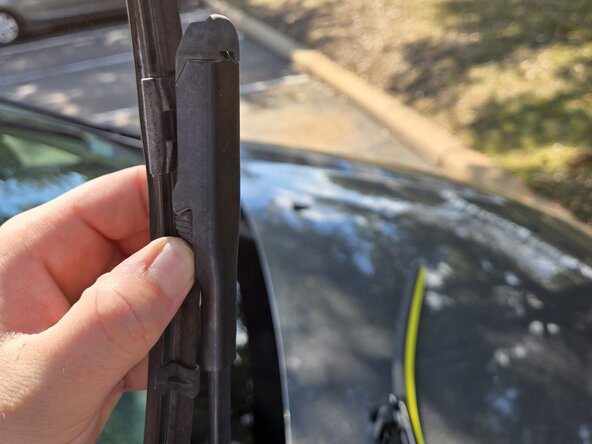
Squeeze the pressure release tabs and rotate the wiper blade outward to unlock it.
-
Once released, lift the blade off the mounting tab to remove it completely.
-
-
-
Align the bottom edge of the new wiper as shown in the first image.
-
Seat the wiper fully onto the mounting tab, as seen in the second image.
-
Close the top clasp to secure the new wiper in place.
-
-
-
Squeeze the pressure tabs on the passenger-side wiper and rotate the blade toward the windshield to release it.
-
Once released, lift the old wiper off to remove it completely.
-
-
-
Align the bottom edge of the new passenger-side wiper as shown in the first image.
-
Seat the wiper fully onto the mounting tab, as seen in the second image.
-
Close the top clasp to secure the new wiper in place.
-
-
-
Start the car by pressing the brake pedal and the ignition.
-
Push the wiper control stalk downward (on the right side of the steering wheel) to activate the wipers. This will move the blades into their stowed position.
-
Turn the car off by pressing the ignition button again once the blades are stowed.
-


 Ask FixBot




You now have new wiper blades! You're free to enjoy a clear driving experience in all kinds of weather.

Team

Austin Community College, Team 67-4, Kapoor Fall 2025 Member of Austin Community College, Team 67-4, Kapoor Fall 2025
AUSTINCC-KAPOOR-F25S67G4
1 Member
12 Guides authored
