
Battery
|
4 Answers 0 Score |
How do I boot into safe mode? |
|
2 Answers 0 Score |
How do I fix a DVD Drive that won't open? |
|
2 Answers 1 Score |
Turn it on n it goes straight to enter password |
|
1 Answer 0 Score |
How do you clean underneath the keyboard keys? |
Toshiba introduced its Satellite line of notebook computers in 1985. The Satellite L35-S2174 was released in 2006 and features a 60GB hard drive and integrated WiFi. The L35 series comes in several models: L35-S1054 has a 14" screen with a Celeron 410 processor and 1GB of RAM, and the L35-S2366 with a Dual Core Pentium Processor and 512MB of RAM. The S2174 model comes with a 1.6GHz Intel Celeron M 420 processor, 512MB of RAM, and a 15" screen.
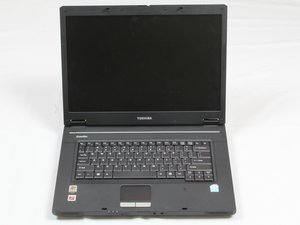
The L35 series laptops (which all look the same) are 14 inches long, weigh 5 pounds, and are made of ABS plastic.
The Toshiba logo is centered on the bottom bezel of the screen, and "Satellite" is printed in the top-right corner above the keyboard.
You can identify your Satellite L35-S2174 by the model and serial numbers printed on a label on the bottom of your laptop.
Release Date: 2005
Developer: Toshiba
Operating System: Microsoft Windows XP Home Edition
Display:
Processor: Intel Celeron M 420 1.6GHz
RAM: 512MB DDR2 SDRAM
Hard Drive: 60GB 5400rpm HDD
Graphics: ATI Radeon Xpress 200M
Wireless: Atheros 802.11b/g
Battery: Detachable 4-cell 2000mah Lithium Ion
CD/DVD Drive: Serial ATA CD-RW / DVD-ROM combo
Dimensions: 14.1 in x 10.3 in x 1.5 in (35.8 cm x 26.2 cm x 3.8 cm)
Weight: 5.07 lbs (2.29 kg)
Toshiba Satellite L35 User Guide
Toshiba Satellite L35 Detailed Specs
UMASSD-CATANIA-F16S1G4
3 Members
60 Guides authored
Past 24 Hours: 1
Past 7 Days: 14
Past 30 Days: 56
All Time: 2,670



