|
No Answers 0 Score |
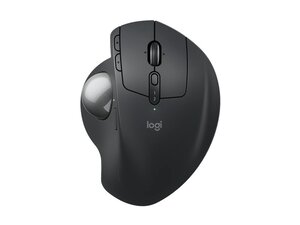
Replacement board for the Logitech MX Ergo S Trackball |
Background
The MX Ergo S Advanced Wireless Trackball is an ergonomic, tilt-adjustable trackball mouse designed for reduced forearm movement and extended comfort. It features a 20-degree tilt angle, six customizable buttons, quiet-click buttons, and fast USB-C charging for long usage between charges. The shell is produced using recycled plastics and a durable matte finish intended for long-term daily use. Certified by ergonomists, the device emphasizes precision control while minimizing arm motion.
Identification
The Logitech MX Ergo S trackball has model number MR0113 (FCC ID JNZMR0113). CU0021 identifies the separate USB receiver. The model label is on the underside of the device. This label lists the model (M/N), part (P/N), and serial (S/N) numbers.
Specifications
- Form Factor: Ergonomic adjustable trackball (tilt up to 20°)
- Model / SKU / MPN: MX Ergo S - Graphite — SKU/MPN 910-007259; MX Ergo S Plus — SKU/MPN 910-007247
- Buttons: 6 customizable buttons (programmable via Logi Options+)
- Primary Button Switches: Quiet-click mechanism (Logitech design; manufacturer not disclosed)
- Connectivity: Wireless (multi-device pairing via wireless radio/Bluetooth and USB receiver support)
- Charging: USB-C quick charging (USB-C cable not included as listed on product page)
- Materials: Made with recycled plastics and durable matte finish for long-term use
- Certification: Ergonomist-certified design (20° tilt for reduced forearm strain)
- Box Contents (as listed): MX Ergo S device; documentation (note: USB-C cable listed as not included on product page)
- Historical announced price: $99.99 USD for MX Ergo S and MX Ergo S Plus in September 2024; the Plus version was offered in North America
Troubleshooting
Common repair-relevant faults include ball jamming or erratic tracking from dirt/debris (diagnose by removing and cleaning the ball and optical sensors), failing/unstable button clicks (diagnose by testing button response in software and checking switch contacts), and charging/USB-C connector problems (diagnose by testing with a known-good USB-C cable and inspecting the port for debris or damage).
For additional troubleshooting help, visit Logitech Support for product support and Logi Options+ downloads.
Additional Information
Warranty Info
Warranty varies by region; check Logitech's warranty page linked from the product support site for region-specific terms.

