Popular Forum Questions
Ask a QuestionThere are no questions. Be the first to ask a question!
Documents
Background
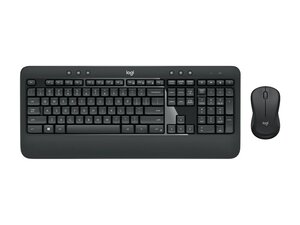
The MK540 Advanced is a full‑size wireless keyboard and contoured ambidextrous mouse combo designed for everyday productivity, offering a familiar key shape, size, and feel alongside a plug‑and‑play USB wireless receiver. The set is built with durable plastic housings designed for prolonged daily use and an emphasis on comfort and reliability. Key features highlighted by Logitech include a full‑size keyboard layout, contoured ergonomic mouse, and a simple plug‑and‑play wireless connection. The product listing also calls out sustainability considerations, including a published carbon footprint value.
Identification
The Logitech MK540 ADVANCED Wireless Keyboard and Mouse Combo includes Keyboard (M/N Y-R0012), Mouse (M/N M-R0050) and USB receiver (M/N C-U0007). Model labels are located as follows — Keyboard: on the underside product label; Mouse: on the underside product label; USB Receiver: printed on the flat face or side of the receiver housing near the USB plug. Each component carries its own model (M/N) and serial (S/N) identifiers.
Specifications
- Form Factor: Full‑size keyboard (with number pad) + contoured ambidextrous mouse
- Switch Type: Membrane / rubber‑dome keys (manufacturer/model not specified on product page)
- Connectivity: Plug‑and‑play 2.4 GHz USB nano receiver (wireless); product page describes plug‑and‑play wireless connection (receiver model not specified)
- Power: Battery‑powered keyboard and mouse (exact battery types and capacities not specified on product page)
- Material: Durable plastic housings with contoured mouse design; marketed for comfort and long‑term everyday use
- Sustainability: Documented carbon footprint: ~10.17 kg CO2e (value published on product page)
- Compatibility / Software: Works as a basic HID keyboard/mouse; Logitech recommends Logi Options+ for extended features (product/support pages reference Logi Options+)
- In the Box / Parts: Keyboard, mouse, USB wireless receiver — specific spare part numbers not listed on product/support pages
- Spare Parts Availability: Support page indicates no spare parts listed for this product on Logitech support (no part numbers provided)
- Other Features: Familiar key shape, size and feel; contoured comfort mouse; emphasis on plug‑and‑play ease and responsible manufacturing practices
Troubleshooting
Common repair‑relevant faults include unresponsive keys, sticky or intermittent key behavior, and wireless connectivity or receiver recognition failures. Diagnostic steps: check/replace batteries, try the receiver in a different USB port or PC, re‑pair or reinstall Logi Options+ (or test as basic HID device), and inspect keycaps/underlying membrane for debris or corrosion. For mouse issues, verify battery contacts and test on another surface or system to isolate sensor vs. RF problems.
For additional troubleshooting help, visit: Visit https://support.logi.com for product support, software (Logi Options+), and warranty contact information.
Additional Information
Warranty Info
Logitech provides regional limited hardware warranty information via its support site; see Logitech Warranty page for duration and terms.
Logitech MK540 Advanced Wireless Keyboard and Mouse Combo Product Sheet
Logitech MK540 Advanced Wireless Keyboard and Mouse Combo Data Sheet
Logitech MK540 Advanced Zestaw bezprzewodowej klawiatury i myszy — Dane techniczne
Logitech MK540 Advanced Combo de Teclado e Mouse sem Fio — Ficha Técnica
Logitech MK540 Advanced draadloze muis- en toetsenbordcombinatie — specificaties
Logitech MK540 Advanced ensemble clavier et souris sans fil – fiche technique
Logitech MK540 Fortschrittliches kabelloses Tastatur-Maus-Set – Technische Daten
Logitech MK540 korszerű vezeték nélküli billentyűzet-egér páros – Adatlap
Logitech MK540 Advanced — Ficha de datos de la combinación inalámbrica
Logitech MK540 Advanced – Specifiche del kit mouse e tastiera wireless
Logitech MK540 Advanced — Specifikace bezdrátové sady klávesnice a myši

