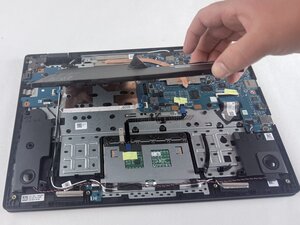
Back Cover

There are no questions. Be the first to ask a question!
These are some common tools used to work on this device. You might not need every tool for every procedure.
The Acer Gateway Chromebook CBO314-1H is a budget friendly Chromebook laptop designed for basic, everyday use. It runs on ChromeOS and is mainly used for browsing the web, watching videos, and working on documents. It has a 14-inch Full HD display, an Intel Celeron N4500 processor, 4GB of RAM, and 64GB or 128GB of storage. It also includes Wi-Fi, Bluetooth, a webcam, and up to about 10 hours of battery life. The device was released around 2021 and has not been officially discontinued. There are no public records showing how many units were sold, and it is available in multiple regions, including the United States and internationally online. It is mainly intended for students, casual users, and remote workers who need an affordable and simple laptop. The typical price ranges from about $200 to $250, depending on the seller and configuration.
There have been no major recalls, but common issues include slow performance when multitasking, limited storage, and general wear, like battery or charging port problems over time. Reviews often praise its low price and good battery life but mention that it can feel slow. Despite these drawbacks, consumer reviews frequently highlight its affordability, portability, and strong battery life as key advantages.
This model is part of the Chromebook 314 family, which focuses on low-cost laptops. Compared to earlier versions, it has a newer processor and better efficiency. Newer models that came after it offer slightly improved performance and options for more memory, but they still target the same budget-friendly market.
To identify the Gateway Chromebook 314-CBO314-1H, first check the model number, which is located on the bottom of the device, and can also be found under the battery. The Chromebook has a 14 inch screen, and would either have a gray or silver finish. Another way to confirm the model would be by checking the system settings. To do this go to “Settings” > “About Chrome OS” > Device Specifications" where the exact model number will be listed.
CPU: Intel® N4500 Celeron® 1.10 GHz Dual-core (2 Core™) Processor
Integrated GPU: Intel® UHD Graphics
Display: 14” LCD 1080p@60Hz
Battery: Lithium ion cell rated for 53Wh and 10.5 hours of battery life
Memory: 4GB LPDDR4X SDRAM
HDD: 64GB Emmc
USB Ports:
Bluetooth Support: Yes
Wi-Fi:
Webcam: Yes
MicroSD slot: Yes
Camera: 0.3 MP 1280x720 Webcam
Headphone Jack: Yes
Audio: Stereo speakers on the bottom
Sources: Amazon, Acer, Newegg, User Manual
User Manual Gateway Chromebook CBO314
UMASSD-EVANS-S26S1G2
4 Members
60 Guides authored
Past 24 Hours: 3
Past 7 Days: 5
Past 30 Days: 31
All Time: 144