Free Shipping on Domestic Orders $75+

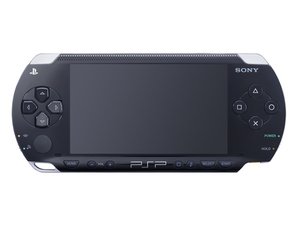
Released in Japan on December 12, 2004, in North America on March 24, 2005, and in Europe on 1 September, 2005.

My PSP 1001 won't power on

Hi, I have a PSP 1001 from when it came out. Is a really old device but it was working some years ago, I remember modding it and play on it without issues. I abandoned it and recently I wanted to boot it up again but it just doesn't turn on. If I plug in a charger it doesn't turn on any LED, with or without a battery. I tried the following:

  1. 1. I measured if the charger was inputing the right voltage to the device and it does. It receives 5V
  2. 2. I checked the power fuse, it is not blown out
  3. 3. I changed the flex cable that connect the power switch board to the main board. It didn't changed anything

Some note is that if I press the connector where the flex cable of the power switch board connect to, the LED faintly turns on and I was suspecting the flex cable was faulty but maybe I was just shorting some pins. (When I opened up to check if something was wrong, this flex cable was disconnected from the power switch board)

I don't know if it has a similar behavior as with the DS that if a flex cable is not connected properly it won't boot or if using a new battery will help aswell (I doubt it as when the charger is connected it doesn't do anything)

If someone can help me troubleshoot it will be appreciated, I really want to bring it back to life as it gives me a lot of nostalgia.

Answered! View the answer I have this problem too

Is this a good question?

Score 0
Add a comment

1 Answer

Chosen Solution

Hi!

First of all, I would replace the battery. They are known to fail. So this will be a nice test as well to see how it goes.

If a new battery won’t fix it as well, I recommend to replace the cable that connects to the power board.

First of all, I would start with replacing the battery first. The most easy test as well.

Please let us know how that goes!

Was this answer helpful?

Score 1

4 Comments:

I could try the battery, I didn’t as I thought it wouldn’t change anything but I can try.

The cable you mention is the one that connects the motherboard to the power board? (And also the right bumper) because I already did that and didn’t fixed it. I was thinking that maybe changing the power board as well

by

Yes, I recommend to replace the battery anyway :)!

Yes, that is the cable I meant. Okay, replacing the powerboard is another option too, but it should show the orange LED when charging there (which is no part of turning it on). But, if the power board is completely done for, it could still be broken yes..

Please let me know if that worked or not! Thank you!

by

Hi, after ordering some parts it was the battery (I bought a Ostent OS battery for 2000/3000 by error but it still works) that solved the issue. I swapped the power board first as was the first thing to arrive and it didn’t worked. Is funny how the most simple solution is sometimes the correct one. Thanks!

by

Ah, glad that you got it fixed :)! It is indeed, sometimes it's just that! Have a great day and take care! Thanks for the update :)!

by

Add a comment

Add your answer

Brian Navarro will be eternally grateful.
View Statistics:

Past 24 Hours: 3

Past 7 Days: 8

Past 30 Days: 31

All Time: 94