
Free Shipping on Domestic Orders $75+

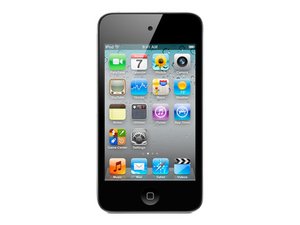
Model No. A1367 / 8, 16, 32, or 64 GB capacity

Why won't my iPod charge?

The cable isn't the problem. It works fine on other apple products, but on my ipod touch 4th generation, i think my ipod doesn't have connection to the charger. Maybe there's something wrong with the input in my ipod??

Answered! View the answer I have this problem too

Is this a good question?

Score 6
9 Comments

Is your iPod still coming on at all? Does it get recognized by iTunes? Did anything happen to it before this became an issue?

by

my I pod is not recognizing my charging cable

by

I have the same thing. It won't be recognized by iTunes or show that its charging, but when I plug it in and leave it for and hour it will charge. It is really starting to annoy me and my local apple store can't fix it. Please help!!!

by

My iPod doesn't seem to recognize the charger but the charger works for other devices plus the iPod works fine otherwise.

by

hello my ipod isn't charging either and this time it is a 6g instead of a 4g so yeah

by

Show 4 more comments

Add a comment

8 Answers

Chosen Solution

Katerina, check the dock connector (the part on the bottom where you plug your cable in) make sure that it is clean, no dust in there, that the pins are not broken, bend or corroded. Clean it with some isopropyl alcohol and a few puffs of compressed air. after that, try to charge it from an AC adapter, not a computer. If none of that works, you might consider changing the battery. Follow this guide to get it accomplished. Hope this helps, good luck.

Was this answer helpful?

Score 1

2 Comments:

well some of my metal bars are broken ans bent but its been like that for about a year and its been fine tell now.

by

but i have a 6g not a 4g

by

Add a comment
Most Helpful Answer

I have this problem to.

It is really really really annoying!!!:(

It just stays on the charging page with a red battery sign!!!

I've had the bottom removed and replaced already but it hasn't changed I can't reset it because I can't even get to my settings!!!!:( HELP!!!!!!!!!!!!!

Was this answer helpful?

Score 2
Add a comment

Same here I had that problem. My laptop wasn't recognize my Itouch. So what I did is I connect to newer windows 8 laptop and press the bottom below then I restored my Itouch to factory setting. After that I saw the recharge sign again. This might help.

Was this answer helpful?

Score 1
Add a comment

This is not an answer..... My ipod is not charging either,I don't know what has happened to it. So this all started about a year ago at the beach..my ipod went dead so of course i plugged it in and it said it was charging and hour later I came back and it was not charged! I put it in my bag and left it there until the end of my beach trip and then when I got home it was still doing the same thing....Then here recently I got it to charge,I was so happy,but now all of a sudden,IT WONT CHARGE AGAIN!!i'm really getting frustrated with it now...PLEASE HELP ME!!!!! I appreciate any help I can get... Thanks!

Was this answer helpful?

Score 1

2 Comments:

That's the same thing that happened to me.My iPod touch is not responding to the charger, it won't charge it just keeps saying 'this accessory may not be supported' and it driving me crazy PLEASE HELP!!!

by

same that happened to me to

by

Add a comment

Mine does that too and I have no idea on how to fix it!!!

Was this answer helpful?

Score 0
Add a comment

Make sure your Bluetooth is off! I was stumped for a while but then noticed it was on and as soon as I turned it off my iPod started charging again!

Was this answer helpful?

Score 0
Add a comment

I have an Ipod Touch 4th Generation, and HAVE FOUND THE SOLUTION

Unlike modern phones it seems that getting the charging state right is absolutely vital.

  1. Ipod on + charging cable in ---> will not charge 'charging not allowed with accessory' error message
  2. Ipod appears to be in charging state with great big charging symbol + charging cable in ---> will not charge
  3. WHAT YOU NEED TO DO IS HAVE THE IPOD TOUCH 4th G switched on, THEN PLUG THE CHARGER IN, NOW SWITCH THE IPOD OFF, NOW THE SCREEN SHOULD BE BLACK, DO NOT TOUCH A SINGLE BUTTON AFTER YOU SWITCH IT OFF. I USUALLY LEAVE IT 16 HOURS.

Using method 3, my Ipod Touch even though it is old, charges up about 60% and has a battery life of about 10 hours.

I was mystified by the problem, now I always charge it by method 3.

Please give a helpful score if this works for you!

Was this answer helpful?

Score 0
Add a comment

My 4th Gen Touch has served as car stereo for years, it's been stellar - until recently. It won't charge unless it is on.

It's been connected to a 12v to USB cigarette lighter adapter all this time, and I suspect that adapter might not have been the thing to use.

Put a new battery in it a week ago (thank you iFixIt!), hoping that would solve it, but no. I have a USB charger in the shop with current readout, and I can watch charge drop to zero the instant I turn iPod off. Turn it on, and it starts charging again. Doesn't draw much - .15A or so - and it will continue showing .15A all night and next day while still saying battery is low. Everything else works as it should. Couldn't get to a full charge, but let it run overnight on battery until dead. No help. Will try plugging into computer and a few other suggestions, but I wouldn't be surprised if these gas staton-variety adapters are not good to use on iPhones, iPods, iPads, and sensitive electronics.

Presently making an adapter using a Buck converter (N117, max 3A output) that I've used to power cameras and GPS for over a decade. Dunno if the 4th Gen Touch will return to normal, but won't risk damage to the 6th Gen that will likely replace it.

Was this answer helpful?

Score 0
Add a comment

Add your answer

Katerina will be eternally grateful.
View Statistics:

Past 24 Hours: 1

Past 7 Days: 5

Past 30 Days: 35

All Time: 40,005




